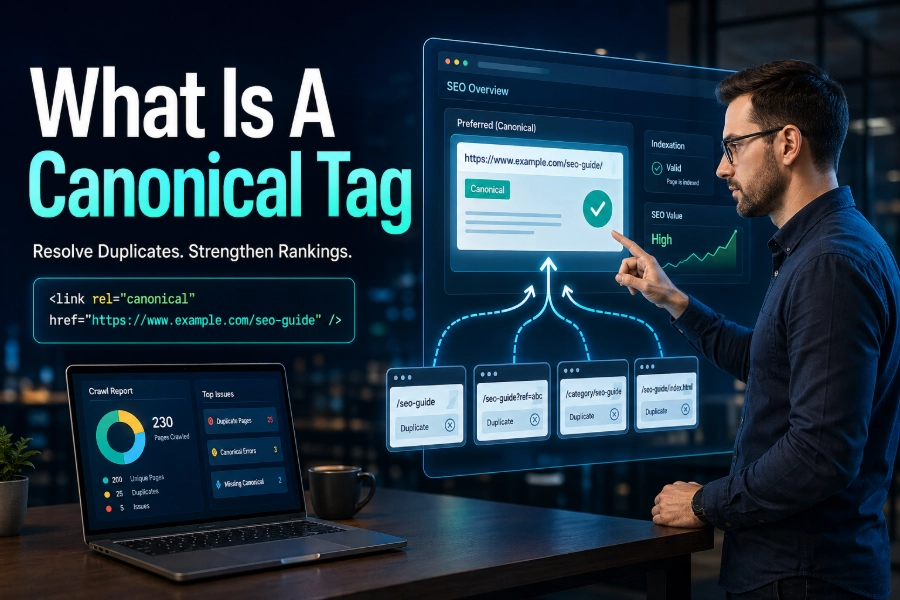
What is a canonical tag? It is an HTML signal that tells search engines which URL should be treated as the main version when duplicate or very similar pages exist. You may have a single page available under several URLs due to tracking parameters, filters, CMS settings, HTTP and HTTPS versions, or category paths.
Without a clear canonical URL, Google may choose the wrong version, split ranking signals, or index a page you never wanted to prioritize. This guide explains how canonical tags work, when to use them, and how to avoid common mistakes that quietly weaken SEO performance.
What Is A Canonical Tag In SEO?
A canonical tag is a piece of HTML placed inside the <head> section of a webpage to identify the preferred URL for indexing and ranking signals. It usually looks simple, but its role is important because it helps search engines determine which version of a page should appear in search results. If your page exists in several versions, the canonical tag points crawlers toward the version you want them to trust.
For example, a product page may load with filters, tracking tags, or alternate paths while showing almost the same content. Search engines can crawl those URLs separately, even when users see only one useful page. A tool that helps you check URL visibility can support technical audits, and Bulk Index Checker is useful for confirming whether important pages are indexed without manually checking each URL.
The canonical tag does not remove a page, block crawling, or force Google to obey every instruction. It acts as a strong hint that helps search engines consolidate duplicate or near-duplicate pages under one preferred address. When your canonical signals match your internal links, XML sitemap, redirects, and content structure, Google has fewer reasons to guess.
Think of canonicalization as a decision-making system for duplicate URLs. You are not only telling search engines which page exists; you are telling them which page deserves the authority, attention, and indexing priority. That clarity can protect your site from duplicate content confusion and keep your strongest pages in front of users.
Why Canonical Tags Matter For SEO
Canonical tags matter because duplicate URLs can dilute SEO signals. When several URLs display the same or nearly the same content, links, relevance, and crawl attention may spread across multiple versions rather than strengthening a preferred page. That can make your best page less competitive than it should be.
Duplicate URLs are common on modern websites. E-commerce stores create filter URLs, blogs create tag and archive pages, SaaS websites test landing pages, and marketing campaigns add UTM parameters. Even small technical differences, such as trailing slashes, uppercase letters, or HTTP versions, can create separate crawlable addresses.
A canonical tag helps you reduce that noise. It guides search engines toward the version that should appear in search results and receive consolidated ranking signals. This is especially helpful when you cannot redirect a duplicate page because users still need it for filtering, tracking, sorting, printing, or product browsing.
Canonical tags also improve crawl efficiency. Search engines have limited crawl resources for every website, especially large sites with thousands of URLs. When canonical signals are clean, crawlers can spend more time discovering useful pages and less time processing unnecessary duplicates.
The biggest benefit is control. If you do not choose a canonical URL, Google may choose one for you based on its own signals. Sometimes it chooses correctly, but sometimes it selects a parameter URL, a weaker page, or a version that doesn’t align with your SEO strategy.
How Canonical Tags Work
Canonical tags work by connecting duplicate or similar URLs to a preferred version. When a crawler visits a page and sees a canonical tag, it reads the tag as a recommendation that another URL should be treated as the main copy. The preferred URL is called the canonical URL.
This does not mean the duplicate URL disappears from the web. Users can still visit it, and search engines may still crawl it. However, the canonical tag tells search engines that ranking signals should usually be applied to the canonical version rather than the duplicate.
Canonicalization also helps when pages are not exact copies but serve the same purpose. For instance, two landing pages may have slightly different introductions, but both target the same search intent and offer the same solution. When that happens, choosing one canonical version can prevent internal competition.
Indexing issues often appear when canonical signals conflict with technical settings. A page may be crawlable but not properly evaluated, or Google may choose a different canonical than the one you selected. When that happens, how to fix page indexing issues is a helpful topic, as indexing problems often stem from mixed signals, blocked resources, poor internal linking, or incorrect canonical choices.
A canonical tag is strongest when it supports the rest of your SEO architecture. Your sitemap should list canonical URLs, your internal links should point to canonical URLs, and your redirects should not contradict them. Consistency makes the tag more reliable.
When Should You Use A Canonical Tag?
You should use a canonical tag when two or more URLs contain identical or highly similar content, and you need one version to be treated as the main page. This situation happens more often than many site owners realize. A single page can be duplicated by tracking codes, sorting options, category paths, printer-friendly versions, or CMS-generated URLs.
Canonical tags are especially useful when redirects are not appropriate. For example, an e-commerce filter page may be useful for users, but too similar to the main category page for search indexing. In that case, you may keep the filtered page accessible while canonicalizing it to the main category.
You should also use canonical tags for campaign URLs. UTM parameters help track marketing performance, but they can create many versions of the same page. A canonical tag tells search engines that the clean URL is the preferred version.
Sitemaps and canonical tags should support each other. Your sitemap should contain the URLs you want search engines to discover and index, while canonical tags should confirm those same preferred pages. If you are unsure how this relationship works, is sitemap important for SEO explains why sitemaps help search engines find important URLs and understand your site structure.
Canonical tags also help with syndicated content. If your article is republished with permission on another site, the republished version can link back to the original. That helps search engines identify the source that should receive primary credit.
Canonical Tag Vs Redirect
A canonical tag and a redirect solve different problems. A redirect sends users and crawlers from one URL to another, while a canonical tag lets users stay on the current URL while telling search engines which version to prefer. Both tools can support SEO, but they should not be used interchangeably.
Use a redirect when the duplicate page has no independent purpose. If you moved a page permanently, changed a URL, merged two pages, or fixed an old HTTP version, a 301 redirect is usually cleaner. It removes confusion because users and crawlers land on the final preferred URL.
Use a canonical tag when the duplicate URL still needs to exist. Filtered product pages, tracking URLs, printable pages, and alternate sorting views may still be useful to users. In those cases, redirecting every version could damage usability or analytics.
A redirect is more forceful than a canonical tag. Search engines usually follow redirects because the old URL sends them to the new one. A canonical tag is a hint, so Google can ignore it if the content, internal links, sitemap, or redirects suggest a different canonical choice.
The safest approach is to decide what you want each URL to do. If a page should never be accessed, redirect it. If a page can remain accessible but should not compete in search, use a canonical tag.
Canonical Tag Vs Noindex
Canonical tags and noindex tags are often confused, but they send very different messages. A canonical tag says, “This other URL is the preferred version.” A noindex tag says, “Do not include this page in the search index.”
You should avoid using canonical and noindex together on the same page in most cases. The signals can conflict because one asks search engines to consolidate signals to another URL, while the other asks them to remove the page from the index. If Google stops indexing the page, it may not continue processing the canonical signal as expected.
Use noindex when a page should not appear in search at all. Examples include internal search results, thin thank-you pages, private landing pages, or low-value utility pages. Use canonical when a page is a duplicate or near duplicate of another page that should remain indexed.
This distinction matters because canonical tags can preserve ranking signals. If a duplicate page has backlinks or relevance, canonicalization may help pass those signals to the preferred page. A noindex tag may remove the page from search without consolidating value in the same way.
The rule is simple. If there is a better version that should rank, use a canonical tag. If the page has no ranking purpose and no preferred duplicate, use noindex.
Common Canonical Tag Mistakes
One common mistake is pointing every page to the homepage. This is rarely correct because most pages are not duplicates of the homepage. When you canonicalize unrelated pages to the homepage, you may tell search engines to ignore valuable content across your site.
Another mistake is using relative URLs instead of absolute URLs. A canonical tag should clearly show the full preferred address, including the protocol and domain. Absolute URLs reduce ambiguity and make the signal easier for crawlers to interpret.
Many sites also create canonical chains. This happens when Page A canonicalizes to Page B, but Page B canonicalizes to Page C. Search engines may still figure it out, but direct canonical signals are cleaner and more efficient.
Broken canonical URLs are another serious problem. If your canonical points to a 404 page, redirected page, blocked page, or noindex page, search engines may ignore the signal. Every canonical URL should be live, crawlable, indexable, and aligned with your SEO goal.
Multiple canonical tags on one page can also cause confusion. This sometimes happens when plugins, themes, and custom code all insert their own canonical tags. If the tags disagree, Google may choose a canonical on its own.
How To Choose The Right Canonical URL
The right canonical URL is the version you want users to find in search results. It should be the cleanest, most complete, most useful, and most internally supported version of the page. If several URLs show the same content, choose the one that best represents your long-term SEO strategy.
Start with the URL that already receives the strongest internal links. Internal links are powerful clues because they show search engines which pages your site treats as important. If your navigation, breadcrumbs, and content links point to one version, that version is often the best canonical choice.
Next, check whether the URL is indexable. The canonical page should not be blocked by robots.txt, marked noindex, redirected unnecessarily, or broken. It should return a clean 200 status code and contain the content users expect.
You should also consider user trust. Clean URLs are easier to share, understand, and remember. A short, descriptive URL is usually better than one filled with parameters, tracking codes, or duplicate category paths.
Finally, keep consistency across your technical signals. The canonical URL should appear in your XML sitemap, internal links, structured data, hreflang annotations, and redirects where relevant. Mixed signals make canonicalization weaker.
Self-Referential Canonical Tags
A self-referential canonical tag points a page to itself. This may sound unnecessary, but it is a good SEO practice for many websites. It tells search engines that the current URL is the preferred version even if parameters or alternate paths appear later.
For example, your clean article URL can include a canonical tag pointing to itself. If someone shares the article with UTM tracking, Google can still understand that the clean version is the main one. This helps protect the page from accidental duplication.
Self-referencing canonicals are especially helpful on large sites. CMS platforms, analytics tools, and advertising campaigns can create extra URL versions without your team noticing. A self-canonical tag gives search engines a stable reference point.
However, self-referential tags must still be accurate. Do not self-canonicalize a page if it is a duplicate that should point somewhere else. The tag should always reflect the page’s real purpose in your site structure.
For most important indexable pages, a self-canonical tag is safe and useful. It reinforces your preferred URL and reduces the risk of Google selecting a less desirable version.
Canonical Tags For E-Commerce Websites
E-commerce websites often need canonical tags because product and category pages can create many duplicate URLs. Filters, sorting options, color variations, size selections, and tracking parameters can multiply one useful page into hundreds of crawlable addresses. Without canonicalization, search engines may waste time crawling duplicates instead of ranking your strongest pages.
Category pages are a common example. A shoe category may have filtered versions for size, brand, color, price, and popularity. Some filtered pages may deserve their own indexable URLs, but many should canonicalize to the main category because they do not offer unique search value.
Product variants require careful judgment. If color or size variants have the same content and do not target separate search demand, canonicalizing them to the main product page may be best. If each variant has unique images, descriptions, reviews, or search intent, separate indexation may make sense.
Canonical tags can also help when the same product appears under multiple categories. A product may live under “running shoes” and “men’s shoes” while showing identical content. Choosing one canonical product URL prevents internal duplication.
The key is search intent. If a URL serves a unique search need, consider making it indexable. If it only repeats another page, canonicalize it.
Canonical Tags For Blogs And Content Sites
Blogs can create duplicate content through categories, tags, archives, author pages, and pagination. These pages are useful for navigation, but they can sometimes compete with original articles. Canonical tags help search engines understand which page should rank for the main topic.
A blog post should usually canonicalize to its own clean URL. If the same article appears through a category path, preview page, mobile version, or tracking URL, those duplicates should point back to the main article. This keeps relevance concentrated on the original post.
Tag and archive pages require more thought. If they provide unique value and target useful search intent, they may be indexable. If they mostly repeat excerpts from articles, they may need canonical tags, noindex tags, or stronger content differentiation.
Pagination is another area where mistakes happen. Each paginated page may need a self-referential canonical if it contains unique items and supports crawling. Canonicalizing every paginated page to page one can hide deeper content from search engines.
For content websites, canonical tags work best when paired with clear topic planning. Avoid publishing multiple articles that answer the same query in nearly the same way. If overlap exists, merge, redirect, or canonicalize strategically.
Canonical Tags And Hreflang
Canonical tags and hreflang annotations must work together carefully. Hreflang tells search engines which language or regional version of a page to show users. Canonical tags tell search engines which URL is the preferred version of a page.
A common mistake is canonicalizing all language versions to one language. For example, an English page, Spanish page, and French page should not usually all canonicalize to the English page. Each language page should typically self-canonicalize because each one serves a different audience.
If hreflang and canonical tags conflict, Google may ignore one of the signals. A page that says “show me to Spanish users” but canonicalizes to an English page sends mixed messages. That weakens international SEO clarity.
The best practice is to let each localized page point to itself canonically. Then use hreflang annotations to connect equivalent language or regional versions. This structure helps search engines understand that the pages are related but not duplicates.
International sites should regularly audit their canonical and hreflang implementations. One small template error can affect hundreds or thousands of localized URLs. Clean alignment protects visibility in multiple markets.
How To Audit Canonical Tags
A canonical audit helps you identify technical issues before they harm search visibility. Start by crawling your website with an SEO crawler and exporting all canonical URLs. Then look for missing tags, duplicate tags, non-indexable canonical targets, redirecting canonicals, and canonicals pointing to unrelated pages.
Next, compare canonical URLs against your XML sitemap. Your sitemap should include the pages you want indexed, not parameter URLs or duplicate versions. If your sitemap lists non-canonical URLs, you are sending search engines a mixed signal.
You should also inspect internal links. If your canonical tag points to one URL but your menus, breadcrumbs, and blog links point to another, Google may trust your internal linking more than your canonical tag. Update internal links so they support your chosen canonical version.
Google Search Console can reveal canonical conflicts. Look for reports where Google selected a different canonical than the user-declared canonical. This often means your content, links, sitemap, redirects, or technical setup does not support your chosen URL strongly enough.
Finally, test important templates after website changes. Redesigns, CMS migrations, plugin updates, and new tracking systems can break canonical tags. A quick audit after each major change can prevent large-scale indexing problems.
Why Google May Ignore Your Canonical Tag
Google may ignore your canonical tag if the signal does not match the page’s content or technical setup. For example, if you canonicalize a thin page to a richer page with very different content, Google may decide the pages are not duplicates. Canonical tags work best when pages are identical or clearly similar.
Google may also ignore a canonical if the target URL is not indexable. A canonical pointing to a blocked, noindex, broken, or redirected URL is weak. The preferred page must be accessible and eligible for indexing.
Internal links can also override weak canonical choices. If your site repeatedly links to a non-canonical URL, search engines may treat that URL as important. Your canonical tag should not fight your own navigation.
Content quality matters too. If the canonical page is weaker than the duplicate page, Google may choose the stronger version. Search engines want to show the best result, not simply the URL you prefer.
The solution is consistency. Make sure the canonical target is the best page, the cleanest URL, the one linked internally, the one in your sitemap, and the one that returns a healthy status code. When every signal agrees, Google is more likely to respect your canonical choice.
Conclusion
What is a canonical tag? It is a practical SEO signal that helps search engines choose the preferred URL when duplicate or similar pages exist. You use it to consolidate ranking signals, prevent URL confusion, support crawl efficiency, and keep your strongest pages visible in search results.
Canonical tags are most effective when they point to clean, indexable, crawlable URLs and match your internal links, sitemap, redirects, and content strategy. They should not replace redirects, noindex tags, or good site architecture, but they are essential for managing duplicate URLs. When you use canonical tags carefully, you give search engines a clearer map of your website and help users find the right page faster.